Event target v currentTarget
In this post, we explore the difference between the target and currentTarget properties in a JavaScript event parameter. We will explore event target and currentTarget in vanilla JavaScript as well as React.

Event bubbling
We need to understand event bubbling before we can understand the difference between target and currentTarget.
When an event is raised on an element, the event handler on that element is invoked. The event handler on its parent element is then invoked and so on. So, the event bubbles up the DOM tree.
Not all events bubble though. For example, the click event on elements does bubble, but the focus event doesn’t. The bubbles property on the event handler parameter tells us whether the event will bubble.
An example
Let’s look at an example:
<div class="container"> <button>Click me</button></div>So, if the button is clicked, the click event should bubble up to the div element.
Let’s handle the click event on the div element then:
const div = document.querySelector(".container");div.addEventListener("click", (e) => { console.log("target", e.target); console.log("currentTarget", e.currentTarget);});If we click the button and look at the console output, we see the difference between target and currentTarget:

targetis the root element that raised the event.currentTargetis the element handling the event.
Event target v currentTarget in React
Do event target and currentTarget behave the same in React apps? Let’s find out:
export default function App() { return ( <div onClick={(e) => { console.log("target", e.target); console.log( "currentTarget", e.currentTarget ); }} > <button>Click me</button> </div> );}If we click the button and look at the console output, we see that target and currentTarget do behave the same as in vanilla HTML/JS:
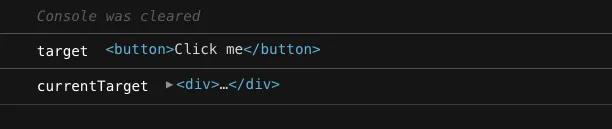
That makes sense really because the React event system is a wrapper around the browser’s native event system.
Wrap up
In an event handler, if we want to reference the root element that raised the event, we can use target. If we’re going to reference the element handling the event, we can use currentTarget.
Learn React with TypeScript - 3rd Edition
NewA comprehensive guide to building modern React applications with TypeScript. Learn best practices, advanced patterns, and real-world development techniques.
View on Amazon