Building a Pager Web Component – Part 3: HTML Import
In the last post, we made use of a template and shadow DOM in our pager web component. In this post, we will make use of HTML import and put our pager web component in a separate file.
Moving the component bits to a separate file
Firstly, let’s create a new file called “pager.html” for our web component and move the template and script tag into there. The contents of pager.html should now be:
<template>  <style>    .x-pager-link {      margin-right: 6px;      text-decoration: none;    }    a.x-pager-link:hover {      text-decoration: underline;    }    .x-pager-text {      margin-left: 20px;    }  </style>  <div>    <a href="#" title="Go to the first page" class="x-pager-link">first</a>    <a href="#" title="Go to the previous page" class="x-pager-link"      >previous</a    >    <a href="#" title="Go to the next page" class="x-pager-link">next</a>    <a href="#" title="Go to the last page" class="x-pager-link">last</a>    <span class="x-pager-text">page x of y</span>  </div></template>
<script>  (function() {    var Proto = Object.create(HTMLElement.prototype),      root;
    Proto.createdCallback = function() {      var template = document.querySelector("template"),        clone = document.importNode(template.content, true);      root = this.createShadowRoot();      root.appendChild(clone);    };
    document.registerElement("x-pager", { prototype: Proto });  })();</script>
Referencing the component
In our page, we can now reference the pager component using a HTML import link tag . The HTML in our page should now be:
<!DOCTYPE html><html>  <head>    <link rel="import" href="pager.html" />  </head>  <body>    <h1>my app</h1>
    <x-pager page="1" page-count="5"></x-pager>  </body></html>
document.currentScript.ownerDocument
If we test our component now by navigating to our page, the component will not work. The problem is how we are referencing the template - document.querySelector("template") does not find it.
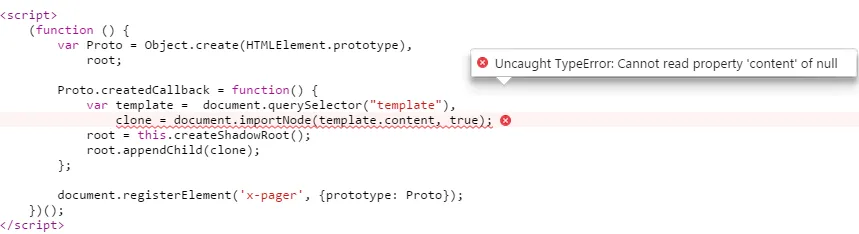
We need to get a reference to the web component document using document.currentScript.ownerDocument and select the template in this. Our changed pager component markup show now be:
<template>  <style>    .x-pager-link {      margin-right: 6px;      text-decoration: none;    }    a.x-pager-link:hover {      text-decoration: underline;    }    .x-pager-text {      margin-left: 20px;    }  </style>  <div>    <a href="#" title="Go to the first page" class="x-pager-link">first</a>    <a href="#" title="Go to the previous page" class="x-pager-link"      >previous</a    >    <a href="#" title="Go to the next page" class="x-pager-link">next</a>    <a href="#" title="Go to the last page" class="x-pager-link">last</a>    <span class="x-pager-text">page x of y</span>  </div></template>
<script>  (function() {    var Proto = Object.create(HTMLElement.prototype),      importDoc = document.currentScript.ownerDocument,      root;
    Proto.createdCallback = function() {      var template = importDoc.querySelector("template"),        clone = document.importNode(template.content, true);      root = this.createShadowRoot();      root.appendChild(clone);    };
    document.registerElement("x-pager", { prototype: Proto });  })();</script>
In the next post we will look at reading the attributes “page” and “page-count”.